TiersTiers
Trang Tiers (hạng) dùng để cấu hình các bậc thành viên như Bronze, Silver, Gold, Platinum. Mỗi tier có tên, thứ tự, điều kiện lên hạng (vd. tổng điểm đạt ngưỡng). User đạt điều kiện sẽ được nâng tier; Admin có thể gán tier thủ công cho user. Thuộc module Client Admin.
Tier là gì?
Tier (hạng thành viên) là các bậc thăng tiến dựa trên điểm tích lũy: Bronze → Silver → Gold → … Mỗi tier có ngưỡng điểm (vd. từ 0 pts = Bronze, từ 1.000 pts = Silver, từ 5.000 pts = Gold). User tích điểm qua hành vi (đăng nhập, nạp tiền, làm nhiệm vụ…) — khi tổng điểm đạt ngưỡng, hệ thống tự nâng hạng. End-user xem tier, điểm và tiến độ lên hạng tiếp theo trong app/website (vd. qua Widget).
Giao diện tier phía client (end-user)
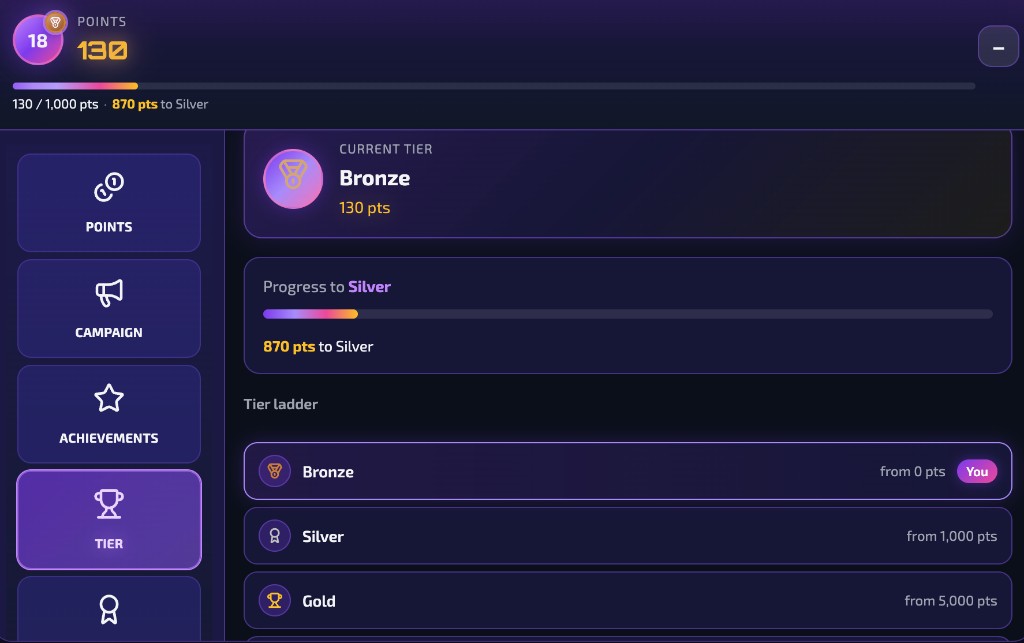
Trên app/website tích hợp Widget (hoặc SDK), user thấy: điểm hiện tại, hạng hiện tại (vd. Bronze), tiến độ lên hạng tiếp theo (thanh progress, số điểm còn thiếu để lên Silver/Gold…) và bảng tier (tất cả hạng và ngưỡng điểm). Nhờ đó user biết mình đang ở đâu và cần tích thêm bao nhiêu điểm để lên hạng.
Giao diện Tier mà end-user thấy trên client (Widget): điểm, hạng hiện tại, tiến độ lên Silver, bảng tier (Bronze / Silver / Gold).
Sử dụng tier như thế nào và có lợi gì?
Cách sử dụng: Bạn cấu hình tier trong Client Admin (tên, thứ tự, điều kiện lên hạng theo điểm). User không cần thao tác gì thêm — chỉ cần tích điểm bằng hành vi (track event qua SDK/Widget). Khi đủ điểm, Engine tự nâng tier; user và bạn có thể dùng tier để áp dụng ưu đãi khác nhau (segment, reward, campaign).
Lợi ích:
- Retention & quay lại: User có mục tiêu rõ (lên Silver, Gold) nên có động lực tích điểm, quay lại app thường xuyên hơn.
- Phân tầng & ưu đãi: Phân segment theo tier (vd. VIP = Gold trở lên) để tặng quà, giảm giá, hoặc mở khóa nội dung riêng cho từng hạng.
- Cảm giác tiến bộ: Thấy rõ tiến độ (vd. 870 pts nữa lên Silver) giúp user gắn bó và tăng engagement.
Ai sử dụng (Client Admin)
Dùng bởi Client Admin (quản trị tenant) sau khi đăng nhập — để cấu hình danh sách tier và điều kiện lên hạng.
Cấu hình trong Client Admin
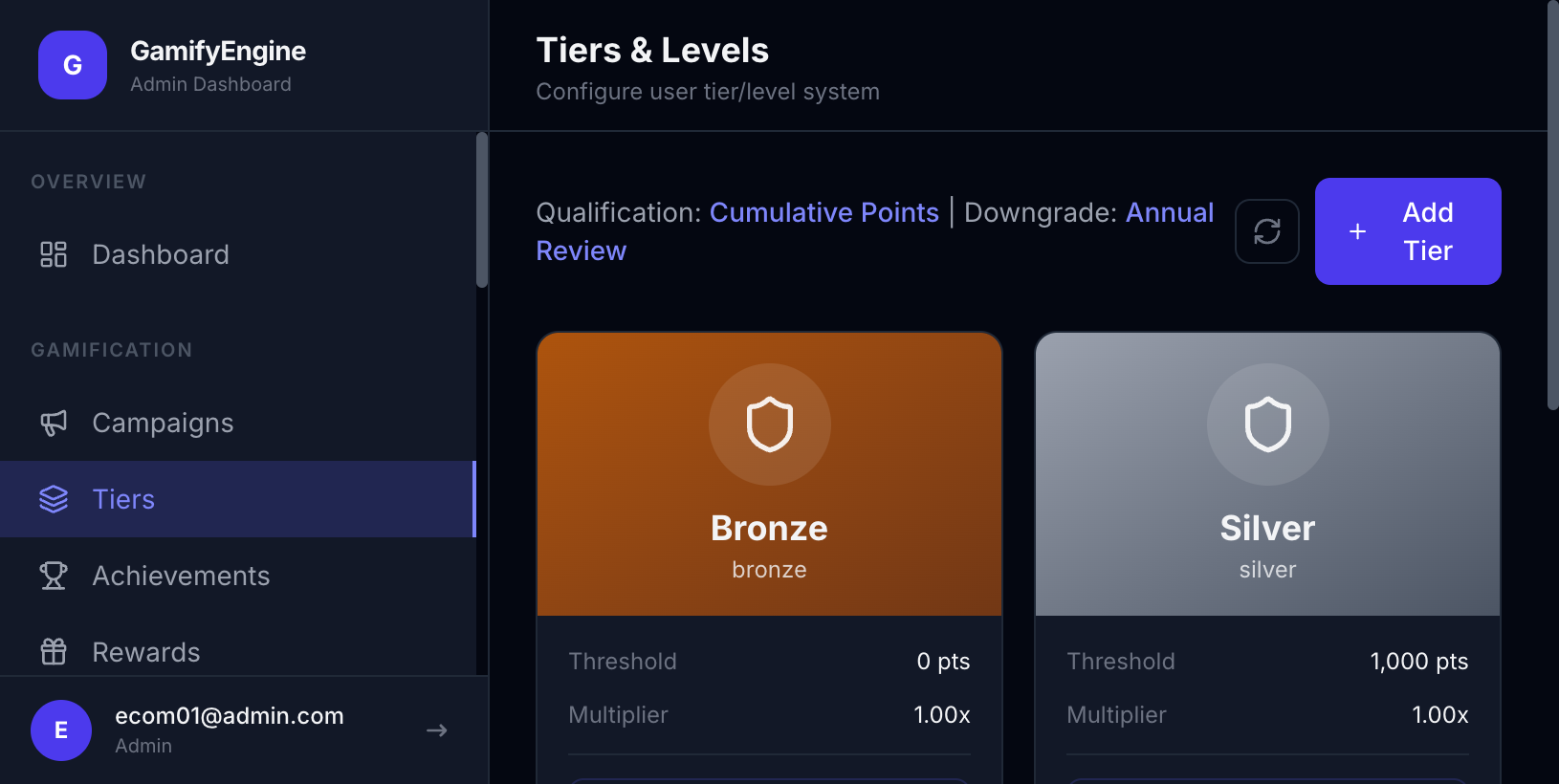
Vào từ sidebar Client Admin → Tiers. Thao tác: xem danh sách tier, tạo tier mới (tên, thứ tự, điều kiện lên hạng theo điểm), sửa hoặc xóa tier. Kết quả: user đạt điều kiện sẽ tự động hoặc được gán lên hạng tương ứng; giao diện client (Widget) sẽ hiển thị đúng tier và tiến độ. Liên quan: Users, Event Types (rule cộng điểm ảnh hưởng điều kiện lên hạng), Widget (user xem tier trên client).
Cấu hình Tiers trong Client Admin. / Tiers configuration in Client Admin.
The Tiers page configures member levels such as Bronze, Silver, Gold, Platinum. Each tier has name, order, and upgrade conditions (e.g. total points threshold). Users meeting conditions are upgraded; Admin can assign tier manually. Part of Client Admin.
What is a tier?
A tier (member level) is a progression rank based on accumulated points: Bronze → Silver → Gold → … Each tier has a point threshold (e.g. from 0 pts = Bronze, from 1,000 pts = Silver, from 5,000 pts = Gold). Users earn points through actions (login, deposit, missions…); when total points reach the threshold, the system upgrades their tier. End-users see their tier, points, and progress to the next tier in the app or website (e.g. via the Widget).
Client-side tier view (end-user)
In the app or website with the Widget (or SDK), users see: current points, current tier (e.g. Bronze), progress to next tier (progress bar, points needed to reach Silver/Gold…), and the tier ladder (all tiers and their point requirements). This lets users know where they stand and how many more points they need to level up.
Tier view for end-users on the client (Widget): points, current tier, progress to Silver, tier ladder (Bronze / Silver / Gold).
How to use tiers and what are the benefits?
How it works: You configure tiers in Client Admin (name, order, upgrade conditions by points). Users don’t need to do anything extra — they just earn points by their behavior (track events via SDK or Widget). When they have enough points, the Engine upgrades their tier; you and your logic can use tier for segments, rewards, or campaigns.
Benefits:
- Retention & return: Users have a clear goal (reach Silver, Gold), which motivates them to earn points and return to the app more often.
- Segmentation & perks: Segment by tier (e.g. VIP = Gold and above) to offer different rewards, discounts, or content for each level.
- Sense of progress: Visible progress (e.g. “870 pts to Silver”) increases attachment and engagement.
Who uses it (Client Admin)
Used by Client Admin (tenant administrator) after login — to configure the tier list and upgrade conditions.
Configuration in Client Admin
Go to Client Admin sidebar → Tiers. Actions: view tier list, create new tier (name, order, point-based upgrade conditions), edit or delete tier. Result: users meeting conditions are upgraded (automatically or manually), and the client (Widget) shows the correct tier and progress. Related: Users, Event Types (point rules affect tier upgrade), Widget (users see tier on the client).
Tiers configuration in Client Admin.