API Key & Track Event & CORSAPI Key & Track Event & CORS
Trang API Key & CORS dùng để quản lý API Key của tenant (tạo, cập nhật, thu hồi), hướng dẫn Track Event và cấu hình CORS. API Key dùng cho server-to-server và widget; sau khi tạo cần lưu vì không xem lại được. Thuộc module Client Admin.
Ai sử dụng
Dùng bởi Client Admin (quản trị tenant) hoặc Developer tích hợp — để lấy API Key và cấu hình track event.
Sử dụng như thế nào
Vào sidebar Client Admin → API Key & CORS. (1) API Key: tạo key mới, đặt tên/mô tả, thu hồi nếu cần. (2) Track Event: trên app/website tích hợp SDK GamifyEngine với apiBaseUrl và apiKey, gọi GamifyEngine.track('event_type', { ...data }); Rules trong Client Admin tự cộng điểm khi khớp. (3) CORS: nếu dashboard chạy domain khác API, backend cấu hình CORS cho origin dashboard. Liên quan: API and Webhook, SDK.
Chi tiết
API Key: Quản lý API Key của tenant (tạo, cập nhật tên/mô tả, thu hồi). Chuỗi token dùng cho server-to-server và widget (chế độ API Key).
Track Event: Cấu hình apiBaseUrl và apiKey (nên do backend trả). Gọi GamifyEngine.track('tên_sự_kiện', { ...data }) khi user thực hiện hành động.
CORS: Backend cấu hình CORS cho phép origin dashboard (method, header Authorization, Content-Type).
CORS — Thiết lập bắt buộc (FE + Backend) mới cắm vào được
Để frontend (website/app) của bạn gọi được Public API của GamifyEngine (track event, Widget, SDK), phải cấu hình CORS đúng cả hai phía: (1) Client Admin — CORS (danh sách origin được phép cho tenant), (2) Backend / nền tảng (danh sách CORS nền tảng nếu có). Nếu request từ trình duyệt có Origin không nằm trong danh sách đã cấu hình, backend trả 403 CORS_NOT_ALLOWED_FOR_TENANT và trình duyệt có thể chặn response — tích hợp sẽ không hoạt động.
Luồng thiết lập:
- Xác định origin của frontend — URL gốc nơi chạy app (vd.
https://app.mytenant.com,http://localhost:5173). Đây là giá trị headerOrigintrình duyệt gửi khi gọi API. - Client Admin → Settings → CORS: Thêm origin vào danh sách “Allowed origins” của tenant. Có thể thêm URL đầy đủ (vd.
https://app.mytenant.com) hoặc pattern subdomain (vd.*.mytenant.com). Danh sách tenant CORS nên nằm trong phạm vi danh sách CORS nền tảng (platform CORS list) nếu có. - Backend / Platform: Đảm bảo nền tảng GamifyEngine (hoặc gateway phía trước) đã cấu hình CORS cho phép các origin tương ứng (trả header
Access-Control-Allow-Origin,Access-Control-Allow-Methods,Access-Control-Allow-HeadersnhưAuthorization,Content-Type). - Lưu thay đổi trong trang CORS (nút “Save changes”). Sau đó frontend chạy từ origin đã thêm mới gọi API thành công.
Cấu hình CORS trong Client Admin — Allowed origins cho tenant.
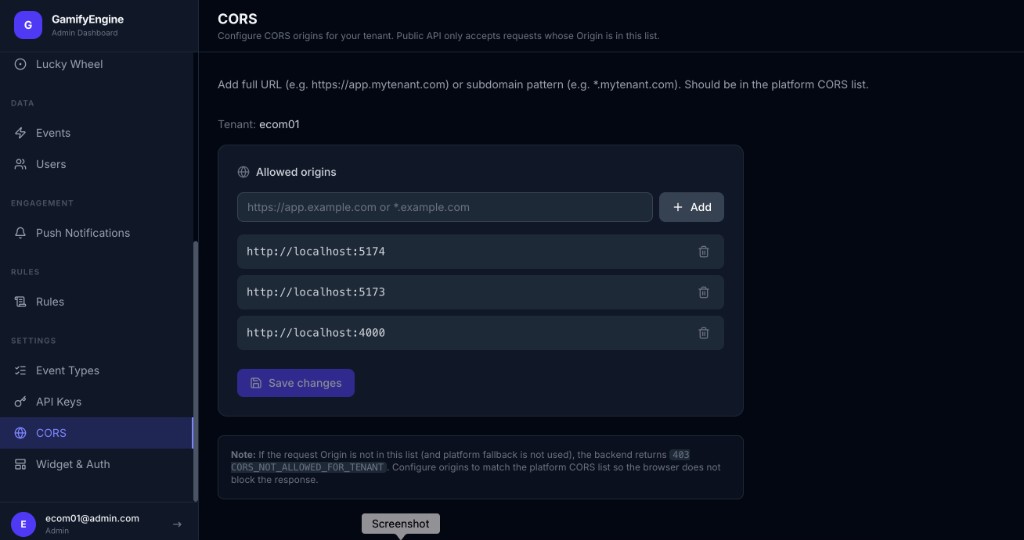
Lưu ý: Nếu Origin của request không nằm trong danh sách Allowed origins (và không dùng platform fallback), backend trả 403 CORS_NOT_ALLOWED_FOR_TENANT. Cần thêm đúng origin vào trang CORS và đảm bảo trùng với cấu hình CORS nền tảng để trình duyệt không chặn response.
Điều kiện chung (Base URL, API Key) xem tại Trang chủ.
The API Key & CORS page manages the tenant’s API Keys (create, update, revoke), documents Track Event, and CORS. The API Key is used for server-to-server and widget; save it when created as it cannot be viewed again. Part of Client Admin.
Who uses it
Used by Client Admin (tenant administrator) or Developers integrating — to obtain API Key and configure track event.
How to use
Go to Client Admin sidebar → API Key & CORS. (1) API Key: create key, set name/description, revoke if needed. (2) Track Event: on your app/site integrate the GamifyEngine SDK with apiBaseUrl and apiKey, call GamifyEngine.track('event_type', { ...data }); Rules in Client Admin award points when matched. (3) CORS: if dashboard runs on a different domain than the API, configure CORS for dashboard origin. Related: API and Webhook, SDK.
Details
API Key: Manage tenant API Keys (create, update name/description, revoke). Token string for server-to-server and widget (API Key mode).
Track Event: Configure apiBaseUrl and apiKey (prefer from backend). Call GamifyEngine.track('event_name', { ...data }) when the user takes an action.
CORS: Backend allows dashboard origin in CORS (methods, Authorization, Content-Type headers).
CORS — Required setup (FE + Backend) to integrate
For your frontend (website/app) to call the GamifyEngine Public API (track event, Widget, SDK), CORS must be configured on both sides: (1) Client Admin — CORS (allowed origins for the tenant), (2) Backend / platform (platform CORS list if applicable). If the browser request Origin is not in the configured list, the backend returns 403 CORS_NOT_ALLOWED_FOR_TENANT and the browser may block the response — integration will not work.
Setup flow:
- Identify your frontend origin — the base URL where your app runs (e.g.
https://app.mytenant.com,http://localhost:5173). This is theOriginheader the browser sends when calling the API. - Client Admin → Settings → CORS: Add the origin to the tenant’s “Allowed origins” list. You can add a full URL (e.g.
https://app.mytenant.com) or a subdomain pattern (e.g.*.mytenant.com). Tenant CORS list should be within the platform CORS list if one exists. - Backend / Platform: Ensure the GamifyEngine platform (or front gateway) is configured to allow CORS for those origins (return
Access-Control-Allow-Origin,Access-Control-Allow-Methods,Access-Control-Allow-Headerssuch asAuthorization,Content-Type). - Save changes on the CORS page (“Save changes” button). Then the frontend running from the added origin can call the API successfully.
CORS configuration in Client Admin — Allowed origins for the tenant.
Note: If the request Origin is not in the Allowed origins list (and platform fallback is not used), the backend returns 403 CORS_NOT_ALLOWED_FOR_TENANT. Add the correct origin in the CORS page and ensure it matches the platform CORS config so the browser does not block the response.
Common prerequisites (Base URL, API Key) are on the Home page.